
Fit and Predict With Your First Scikit-Learn Estimator
Every scikit-learn tutorial shows you the same two lines. Almost none of them stop to show you what changed inside the object between them.

Key topics
Every scikit-learn tutorial shows you the same two lines. Almost none of them stop to show you what changed inside the object between them.
You already know what a model is conceptually: something that learns a relationship from data and uses it to answer questions about data it has never seen. Now you want to watch that happen in code. This article is one small, runnable experiment. Same object, two calls, two very different jobs. By the end, you will be able to point at exactly what fit stored and exactly what predict did with it.
What an Estimator Actually Is
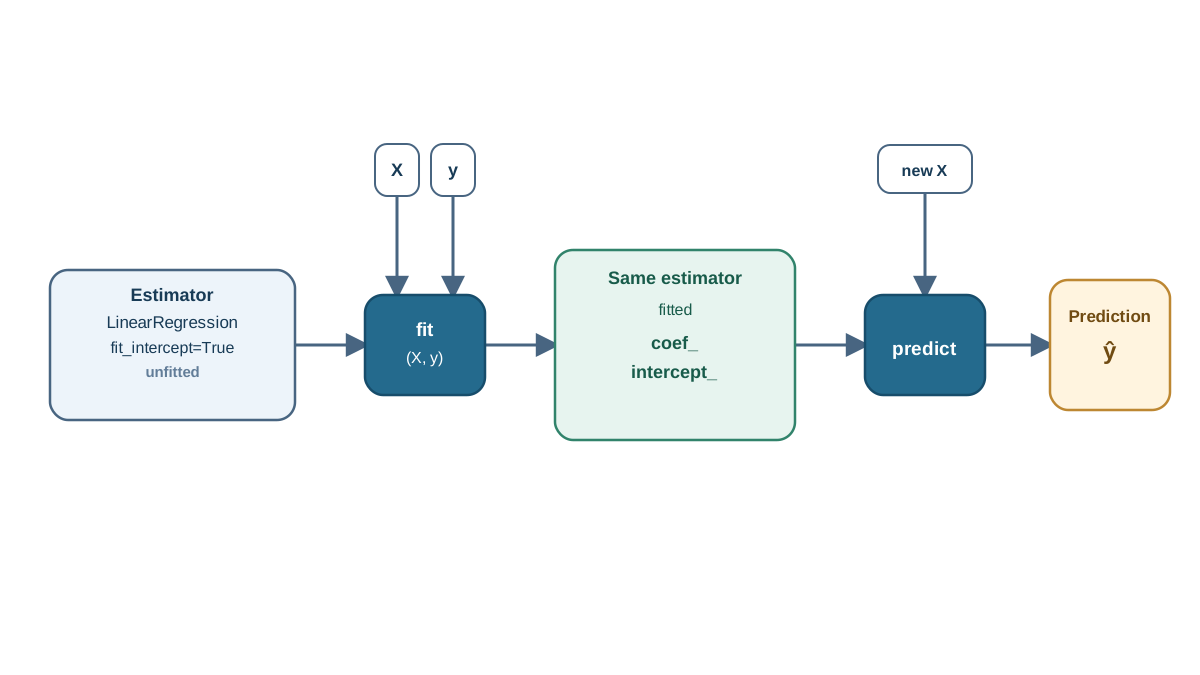
An estimator is a Python object, not a function. You construct it once, then call methods on it. That distinction matters because the object holds state between calls — and that state is the whole point.
When you write LinearRegression(), you are making choices: settings that control how the learning algorithm behaves. Those are called hyperparameters. They live in the constructor, and you set them before any data arrives.
When you call .fit(X, y), the object runs a learning algorithm and stores what it discovered as attributes on itself. scikit-learn marks learned attributes with a trailing underscore — coef_, intercept_ — so you can tell at a glance what you chose versus what the data taught the model.
That convention is not cosmetic. It is the difference between "I decided this" and "the data decided this."
The same interface covers classifiers, regressors, and transformers. Learn it once, and you can swap LinearRegression for LogisticRegression or RandomForestRegressor by changing one line. The workflow transfers; only the learned attributes and the numbers change.
Set Up a Tiny Reproducible Example
You need Python with scikit-learn and numpy installed. Nothing else — no credentials, no external services, no downloads.
I deliberately keep the dataset small enough to check by eye. When you can verify every number by hand, the code stops being magic and starts being arithmetic.
import numpy as np
from sklearn.linear_model import LinearRegression

# One feature: hours studied. One target: exam score.
X = np.array([[1], [2], [3], [4], [5]])
y = np.array([50, 55, 65, 70, 80])

model = LinearRegression()
Two shape rules to internalize now, because they cause most first-run errors:
Xis two-dimensional: rows are samples, columns are features. Even with a single feature, you write[[1], [2], ...], not[1, 2, ...].yis one-dimensional: one target value per sample.
If you have a flat list of feature values, np.array(values).reshape(-1, 1) turns it into a column. That -1 means "figure out this dimension for me."
Common mistake: Passing a 1D array as
X. scikit-learn expects a 2D feature matrix, and it will tell you so — loudly.
Knowledge check
Check your understanding
Answer this question before you continue.
Fit: What Happens When the Object Learns
Now the first real call:
model.fit(X, y)
fit runs the learning algorithm and writes the result onto the estimator. For linear regression, that means finding the line that minimizes squared error between predictions and actual scores. When it returns, the object is no longer blank. It is a fitted model.
fit returns the estimator itself. That is why chaining works:
model.fit(X, y).predict(X)
The return value is the same object you called the method on, now carrying learned state.
Inspect what it learned:
print(model.coef_)       # [7.5]
print(model.intercept_)  # 42.5
Those two numbers are the model. The prediction equation is:
score = 42.5 + 7.5 * hours_studied
Every prediction you make from here is that line evaluated at some input. Nothing more mysterious is happening.
One more thing worth knowing: if you call predict before fit, scikit-learn raises NotFittedError. That is not a bug in your code. It is the object telling you it has nothing to work with yet.
Knowledge check
Check your understanding
Answer this question before you continue.
Predict: Turning Learned Parameters Into Answers
Prediction takes only features — no labels:
new_hours = np.array([[6], [7]])
predictions = model.predict(new_hours)
print(predictions)  # [87.5 95.0]
Notice what you did not pass: any y. That is the entire point. You are asking the model to answer for inputs it never saw during training.
The output shape and meaning depend on the task. Regression returns continuous values. Classification returns class labels. Same method name, different kind of answer.
Here is a subtlety worth sitting with. If you call model.predict(X) on the training rows, you get numbers close to y — but not identical. The model found the best straight line, and real data rarely sits perfectly on a line. That gap between prediction and truth is the residual, and it is where all model evaluation eventually lives.
Note: A prediction is the model's answer, not a guarantee. It is the output of a learned rule applied to an input. Whether that rule is any good is a separate question.
Knowledge check
Check your understanding
Answer this question before you continue.
Read the Output, Not Just the Code
Let's verify one prediction by hand so the number stops being opaque.
For 6 hours studied:
42.5 + 7.5 * 6 = 42.5 + 45.0 = 87.5
That matches the array. You can now trace any prediction back to two learned numbers and one input. This is the payoff of starting with a linear model: the mechanism is visible.
For classification, the raw output is different. A classifier might produce a score or probability, and a threshold turns that into a label. The predicted label is a decision applied to a number — not the number itself. Keep those separate in your head.
For a quick sanity check, score() gives you a single summary number:
print(model.score(X, y)) # R^2, close to 1.0 here
For regression, that is R² — roughly, how much of the variation in y the model explains. A high value on training data is reassuring but not proof of anything. A single score hides a lot, and evaluation deserves its own careful treatment later.
Knowledge check
Check your understanding
Answer this question before you continue.
When It Breaks: Common First-Run Errors
Failure is normal here. Each error message is evidence about what the object expected.
| Error | Cause | Fix |
|---|---|---|
NotFittedError | Called predict before fit | Call fit(X, y) first |
Shape error on X | Passed 1D array where 2D is required | Use reshape(-1, 1) |
| Mismatched sample counts | X and y have different lengths | Check X.shape[0] == y.shape[0] |
| Feature count mismatch | predict got different columns than fit | Pass the same features, in the same order |
That last one is the quiet killer. A model trained on three features expects three features at prediction time, in the same order. Reorder them and you get a confident, wrong answer with no error at all.
The reflex to build: read the error, ask what the object expected, fix the input. Do not go hunting inside the model.
One Small Experiment to Lock It In
Before you run this, predict the outcome. Write it down.
from sklearn.linear_model import LinearRegression

# Add a second feature: practice problems solved.
X2 = np.array([[1, 3], [2, 5], [3, 8], [4, 9], [5, 12]])
model2 = LinearRegression()
model2.fit(X2, y)

print(model2.coef_)
print(model2.predict(np.array([[6, 14]])))
What stayed the same? The interface: create, fit, predict, inspect. What changed? The learned attributes — now two coefficients instead of one — and the numbers.
That is the estimator lifecycle: create, fit, predict, inspect, revise. Every classical estimator in scikit-learn follows it. Once you can run this loop and read the learned attributes, you can pick up any of them.
Your next step: run the experiment above, then deliberately break it. Pass a 1D array to predict and read the error. Then move on to the question this article deliberately left open — whether those predictions are actually good. That is where train/test splits and honest evaluation begin.
Knowledge check
Final check
Finish the article by checking the ideas you just learned.
References
Build stronger machine learning foundations
Use structured resources to connect theory, scikit-learn workflows, and evaluation practice.


