
Save, Reload, and Verify a Scikit-Learn Pipeline
You fit the pipeline, you save it, you load it back, and the predictions look wrong. Nothing crashed. Nothing warned you. The numbers are just quietly…

Key topics
You fit the pipeline, you save it, you load it back, and the predictions look wrong. Nothing crashed. Nothing warned you. The numbers are just quietly different from what you expected.
That failure almost never comes from the saving code. It comes from a weak mental model of what you saved. So before we touch joblib, let's fix the model.
What You Are Actually Saving
When you call pipeline.fit(X, y), scikit-learn doesn't just learn a model. It learns state at every step of the pipeline. A numeric imputer stores the fill values it computed. A scaler stores the mean and scale of each column. An encoder stores the categories it saw. The estimator at the end stores its coefficients or tree structure.
All of that learned state lives inside the fitted pipeline object. When you save the pipeline, you save the whole object graph — every learned number, in every step, in the order the pipeline will apply them.
Here is the classic bug this prevents. You save only the final estimator, then at prediction time you re-apply preprocessing by hand: you scale the new rows yourself, maybe with a fresh StandardScaler fit on the new data. The pipeline runs. The predictions come out. They are plausible and wrong, because your hand-rolled scaling used different means than the ones the model was trained on.
Common mistake: Treating the artifact as a description of the model. It is not a description. It is the fitted object itself, with all its learned state intact. Loading it restores state; it does not re-derive behavior.
If you want the deeper mental model of how a pipeline moves data through fit-time and transform-time, that's covered in the pipeline fundamentals article. Here, we assume you already have a fitted pipeline and want to preserve it.
Knowledge check
Check your understanding
Answer this question before you continue.
Set Up a Pipeline Worth Saving
Version drift is the first thing that breaks a reload, so pin your environment before anything else. This tutorial assumes Python 3.10 or newer, scikit-learn 1.3 or newer, and joblib (which ships with scikit-learn, so it's already installed).
We'll build a small, deterministic example: a numeric column with missing values, a categorical column, and a simple classifier.
import numpy as np
import pandas as pd
from sklearn.compose import ColumnTransformer
from sklearn.pipeline import Pipeline
from sklearn.impute import SimpleImputer
from sklearn.preprocessing import StandardScaler, OneHotEncoder
from sklearn.linear_model import LogisticRegression
from sklearn.model_selection import train_test_split

rng = np.random.default_rng(0)
n = 200
df = pd.DataFrame({
    "age": rng.normal(40, 10, n).round(1),
    "income": rng.normal(50000, 15000, n).round(0),
    "city": rng.choice(["A", "B", "C"], n),
})
df.loc[rng.choice(n, 20, replace=False), "income"] = np.nan
df["label"] = (df["age"] + df["income"].fillna(50000) / 10000 > 45).astype(int)

X_train, X_test, y_train, y_test = train_test_split(
    df.drop(columns="label"), df["label"], test_size=0.25, random_state=0
)

numeric = Pipeline([
    ("impute", SimpleImputer(strategy="median")),
    ("scale", StandardScaler()),
])
categorical = OneHotEncoder(handle_unknown="ignore")

preprocess = ColumnTransformer([
    ("num", numeric, ["age", "income"]),
    ("cat", categorical, ["city"]),
])

pipe = Pipeline([
    ("prep", preprocess),
    ("clf", LogisticRegression(max_iter=1000)),
])

pipe.fit(X_train, y_train)
Now capture reference predictions on rows the model has never seen. These become your expected behavior later.
reference = pipe.predict(X_test)
print(reference[:10])
Write those ten values down. They are your ground truth.
Persist the Whole Pipeline
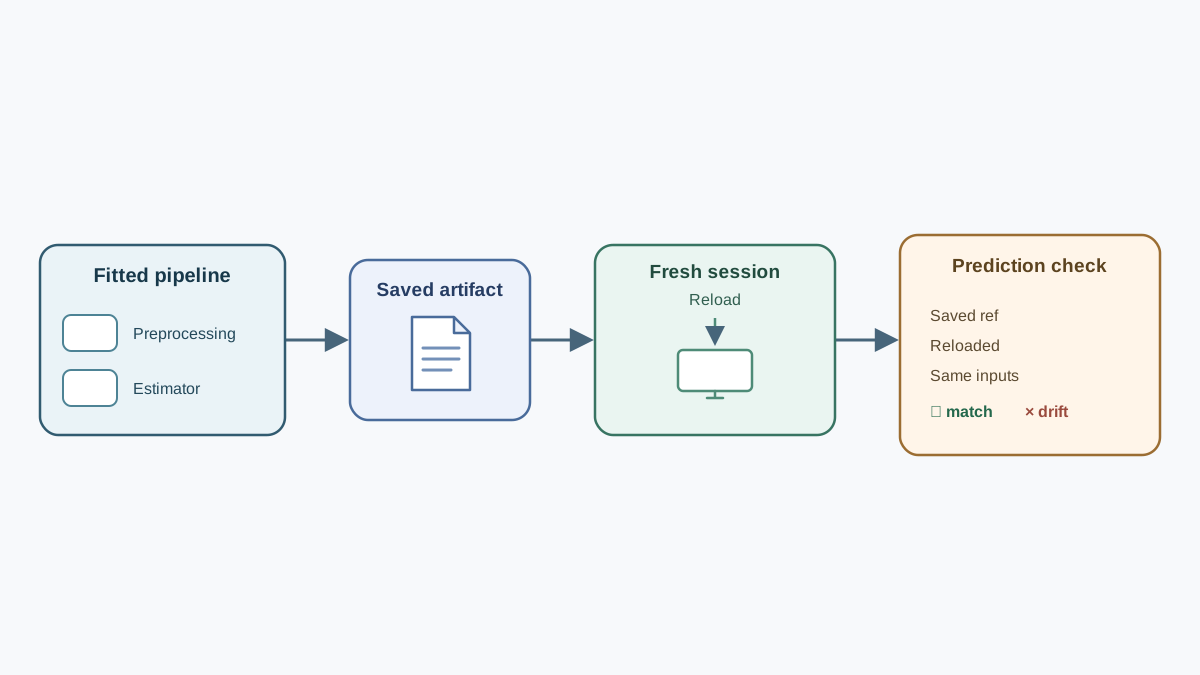
joblib.dump writes the fitted pipeline to a single file. pickle works too and follows the same dump/load shape, but joblib is the default for fitted estimators because it handles large NumPy arrays more efficiently — and fitted estimators are usually full of them.
import joblib

joblib.dump(pipe, "pipeline.joblib")
If you prefer pickle, the equivalent is:
import pickle

with open("pipeline.pkl", "wb") as f:
    pickle.dump(pipe, f, protocol=5)
Protocol 5 reduces memory usage and speeds up storing and loading large NumPy arrays. On modern Python, pickle.HIGHEST_PROTOCOL is equivalent.
Warning: Loading a pickle or joblib file executes code from that file. Only load artifacts you produced or that come from a source you trust. This is not a reason to avoid the format; it is a reason to treat model files like executables, not like CSV files.
Knowledge check
Check your understanding
Answer this question before you continue.
Reload in a Fresh Session
This step matters more than it looks. If you load in the same session where you trained, you are cheating: the original object is still in memory, and any missing dependency or stale import is hidden. Restart the interpreter or open a new script.
But a fresh session has no pipe, no X_test, and no new_rows. So the verification has to be self-contained. Save the reference predictions to disk before you restart, then load them back alongside the artifact.
In the training session, after you compute reference:
np.save("reference_predictions.npy", reference)
Now restart the interpreter. In the new session, load the artifact and the reference predictions together:
import joblib
import numpy as np

loaded = joblib.load("pipeline.joblib")
reference = np.load("reference_predictions.npy")
print(type(loaded))
You should see the pipeline class, not a bare estimator. Confirm the preprocessing state survived by inspecting the scaler's learned statistics:
scaler = loaded.named_steps["prep"].named_transformers_["num"].named_steps["scale"]
print(scaler.mean_, scaler.scale_)
Compare those against the values you noted from the training session. If they match, the learned state traveled with the artifact.
This is also the moment where a missing custom function surfaces. If your pipeline used a FunctionTransformer with a function defined in a script that no longer exists, the load will fail with an unpickling error. The fix is to keep custom code in an importable module, not in a notebook cell.
Knowledge check
Check your understanding
Answer this question before you continue.
Predict on New Inputs and Verify
Now the payoff. Build genuinely new rows — not a slice of the training frame — with the same column names and dtypes the pipeline expects. Because we are in a fresh session, we rebuild the test inputs from the same deterministic seed rather than reusing an in-memory variable.
import numpy as np
import pandas as pd

rng = np.random.default_rng(0)
n = 200
df = pd.DataFrame({
    "age": rng.normal(40, 10, n).round(1),
    "income": rng.normal(50000, 15000, n).round(0),
    "city": rng.choice(["A", "B", "C"], n),
})
df.loc[rng.choice(n, 20, replace=False), "income"] = np.nan
df["label"] = (df["age"] + df["income"].fillna(50000) / 10000 > 45).astype(int)

from sklearn.model_selection import train_test_split
X_train, X_test, y_train, y_test = train_test_split(
    df.drop(columns="label"), df["label"], test_size=0.25, random_state=0
)

loaded_predictions = loaded.predict(X_test)
print(np.array_equal(loaded_predictions, reference))
For a deterministic model, this should print True. Exact equality is the success criterion. The loaded pipeline re-applies the same learned transforms, so identical inputs must produce identical outputs. If they don't, state was lost or the input was shaped differently.
Knowledge check
Check your understanding
Answer this question before you continue.
When the Reload Breaks
Most reload failures fall into four buckets. Learn to recognize them by their signal.
| Failure | Signal | Fix |
|---|---|---|
| Version mismatch | Warning or exception on load | Pin scikit-learn version; record it alongside the artifact |
| Missing custom code | AttributeError or unpickling error | Move custom functions into an importable module |
| Silent semantic drift | Predictions shift, no error | Match column names and dtypes; for arrays, match column order exactly |
| Shape or dtype error | Exception on predict | Pass a DataFrame with the training-time schema |
The dangerous one is silent semantic drift. A column gets renamed or retyped, and the pipeline happily produces numbers that are wrong. It does not raise. It does not warn. This is why the verification step above is not optional.
One Experiment: Break It on Purpose
Change one thing and watch what happens. Reorder the columns of your input frame:
reordered = X_test[["city", "income", "age"]]
print(np.array_equal(loaded.predict(reordered), reference))
This still prints True. The pipeline matched columns by name, so reordering a DataFrame is safe. That is a real property of ColumnTransformer, and it is worth knowing.
Now try the same reorder with a raw NumPy array, which has no column names to match against:
array_input = X_test[["age", "income", "city"]].to_numpy()
reordered_array = array_input[:, [2, 1, 0]]
print(np.array_equal(loaded.predict(reordered_array), reference))
This prints False. No error. The pipeline fed the wrong values into the wrong features because positional arrays carry no names. That is the silent semantic drift the table warns about — and it only bites when you drop the column labels.
Restore the order and confirm predictions return to the reference values. Then try the second probe: load the artifact in an environment with a different scikit-learn version and note the warning or failure.
The point is not the specific bug. It is that you now have a repeatable check — save, reload fresh, compare against reference predictions — that you can run on every artifact you ship.
Where This Leads
The decision rule is short. Save the fitted pipeline, not the estimator. Reload in a fresh session. Compare against reference predictions before you trust the artifact.
That last check catches state loss. It does not catch a schema mismatch between training and inference, because both runs used the same input. The next practical concern is defining and checking the input schema itself, so new data cannot quietly break predictions even when the artifact is perfectly faithful.
Knowledge check
Final check
Finish the article by checking the ideas you just learned.
References
Build stronger machine learning foundations
Use structured resources to connect theory, scikit-learn workflows, and evaluation practice.


