
Save and Load a Scikit-Learn Model: Preserve the Whole Prediction Workflow
You trained a model. It scored well. You saved it with a sigh of relief. Then, weeks later, you load it, feed it new data, and get predictions that are…

You trained a model. It scored well. You saved it with a sigh of relief. Then, weeks later, you load it, feed it new data, and get predictions that are complete nonsense.
What went wrong? Most likely, you saved only the model—and left the preprocessing behind.
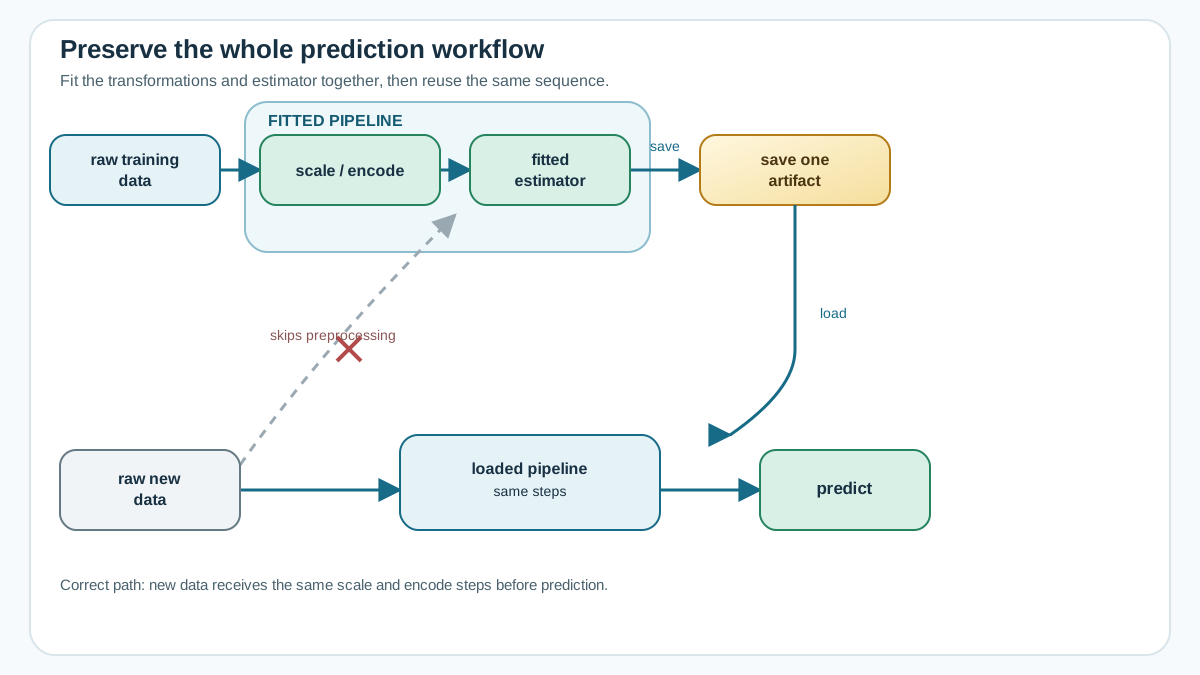
A fitted scikit-learn model is not a standalone object. It is the final step of a workflow that includes scaling, encoding, and other transformations. Save the whole pipeline, not just the estimator at the end of it.
Why Saving the Model Alone Is Not Enough
Here is the mental model that will save you hours of confusion: a fitted model expects input in the exact shape and scale it saw during training.
Imagine you trained a model on features that were scaled to have a mean of zero and a standard deviation of one. A StandardScaler learned the mean and variance of your training data and transformed every feature accordingly. Your model learned its patterns from those scaled values.
Now you load the saved model and feed it raw, unscaled data. The model sees numbers that are wildly out of range compared to what it learned from. Its predictions are meaningless—not because the model is broken, but because you skipped a step it depends on.
This is like keeping the engine of a car and throwing away the transmission. The engine is impressive on its own, but it cannot move the car without the parts that connect it to the wheels.
If you have worked with scikit-learn pipelines, you already know the solution. A pipeline bundles your preprocessing steps and your estimator into one object. When you call fit on the pipeline, it fits each step in sequence. When you call predict, it transforms new data through the same steps before passing it to the final estimator.
The natural extension is this: save the whole fitted pipeline, not just the final estimator. One file, containing every transformation and the model itself.
Knowledge check
Check your understanding
Answer this question before you continue.
What Actually Gets Saved: The Fitted State
When you save a model, you are not saving code. You are saving the fitted state of a Python object.
Serialization—the technical term for this process—turns a live object in memory into bytes on disk. Loading reverses the process, rebuilding the object so you can use it again.
What lives inside that saved state? For a fitted estimator, quite a lot:
- Learned coefficients or tree splits
- Class labels
- The fitted statistics from preprocessing steps, like the mean and variance a scaler learned from your training data
When you save a pipeline, one file holds the entire journey from raw input to prediction. The scaler remembers the mean it saw. The encoder remembers the categories it learned. The model remembers the patterns it found. Everything travels together.
Scikit-learn recommends joblib for this task, and for good reason: it handles large NumPy arrays more efficiently than Python's standard pickle module. Both follow the same basic pattern, though, and both are worth knowing.
Knowledge check
Check your understanding
Answer this question before you continue.
Save and Load with joblib and pickle
The practical pattern is refreshingly short. You fit a pipeline, dump it to a file, and later load it back.
Here is the joblib version:
import joblib

# Assume 'pipeline' is a fitted Pipeline object
joblib.dump(pipeline, "my_pipeline.joblib")

# Later, in a different session or script
loaded_pipeline = joblib.load("my_pipeline.joblib")
The pickle version looks nearly identical:
import pickle

with open("my_pipeline.pkl", "wb") as f:
    pickle.dump(pipeline, f)

# Later
with open("my_pipeline.pkl", "rb") as f:
    loaded_pipeline = pickle.load(f)
My rule is simple: use joblib for scikit-learn models. It is the tool the library recommends, and it handles the large NumPy arrays that power most models more efficiently. pickle is built into Python and works fine in a pinch, but joblib is the better default for this specific job.
Notice what is being saved in both examples: the pipeline object, not the bare estimator. That single choice is what keeps your preprocessing and your model together.
Verify the Loaded Model Before You Trust It
Here is a habit that takes thirty seconds and can save you from deploying a broken model: after loading, check that the loaded model produces the same predictions as the original.
The procedure is straightforward:
- Before saving, generate predictions with your fitted pipeline.
- Save the pipeline.
- Load it back.
- Generate predictions again with the loaded pipeline.
- Compare the two arrays.
import numpy as np

# Before saving
original_predictions = pipeline.predict(X_validation)

# Save and load
joblib.dump(pipeline, "my_pipeline.joblib")
loaded_pipeline = joblib.load("my_pipeline.joblib")

# After loading
loaded_predictions = loaded_pipeline.predict(X_validation)

# Confirm they match
np.array_equal(original_predictions, loaded_predictions)
If that final check returns True, your model survived the journey intact. If it returns False, something broke—a version mismatch, a corrupted file, an environment difference. Investigate before you trust the loaded model.
This is the beginner-friendly version of a regression test for your model artifact. Make it a reflex, especially when you move between environments or Python versions.
Knowledge check
Check your understanding
Answer this question before you continue.
The Boundaries: Versions, Security, and Data Schema
Model persistence has three real limits. None of them should stop you from saving and loading models, but all three deserve your respect.
Version boundary. A model saved with one version of scikit-learn may not load cleanly in another. The internal representation of models can change between releases. The safest approach is to keep the environment consistent: same scikit-learn version, same numpy version, same Python version. If you must move to a new environment, test the loaded model carefully—which is exactly what the verification step above is for.
Security boundary. Loading a pickle or joblib file is not like reading a CSV. These formats can execute arbitrary code when loaded. A malicious file could run anything on your machine. Only load files you created yourself or that come from a source you trust completely. Treat a model file from an unknown sender the way you would treat an executable program.
Schema boundary. Saving the model does not make it tolerant of new inputs. The loaded pipeline still expects the same columns, in the same order, with the same types it saw during training. If your production data has a renamed column, a reordered feature set, or a new categorical value, the pipeline will fail or—worse—silently produce bad predictions.
These are boundaries to recognize now, not problems to fully solve. Full deployment infrastructure and model serving are topics for another day.
Knowledge check
Check your understanding
Answer this question before you continue.
Common Mistakes and How to Recover
Every beginner makes these mistakes. Here is how to recognize them and recover quickly.
Saving only the estimator. You trained a model, saved it with joblib.dump(model, "model.joblib"), and later fed raw data straight into it. The fix is to go back to your training code, wrap the preprocessing and model in a Pipeline, fit the pipeline, and save that instead.
Re-applying preprocessing manually at prediction time. You saved the scaler separately and the model separately, and now you have to remember to transform data before predicting. This works, but it is fragile. Every time you forget the scaling step, you get silent nonsense. The pipeline approach eliminates this class of error entirely.
Loading in a different environment. You trained on one machine, moved the file to another, and got an import error or an attribute error. The fix is to match versions between environments, or rebuild the model in the target environment if versions cannot be aligned.
Trusting a loaded model without checking. You loaded the file, ran a prediction, and assumed it was correct. The fix is the verification step: compare predictions from the original and loaded models. Make this a habit and you will catch serialization problems early, when they are cheap to fix.
The Decision Rule
When you finish training a model, remember three things:
- Save the whole fitted pipeline, not the bare estimator. The preprocessing must travel with the model.
- Verify loaded predictions against the originals before you trust the loaded model.
- Respect the boundaries: version consistency, file security, and data schema.
Your next step is to take a model you have already trained, wrap it in a pipeline if you have not already, and run through the full save-load-verify cycle. Once you have a verified model artifact, you are ready to think about the next challenge: turning that artifact into a repeatable prediction workflow that new data can flow through safely.
Knowledge check
Final check
Finish the article by checking the ideas you just learned.
References
Build stronger machine learning foundations
Use structured resources to connect theory, scikit-learn workflows, and evaluation practice.


