
ColumnTransformer Explained: Apply the Right Preparation to Each Feature Type
One dataset, many feature types, one honest workflow. That is the problem ColumnTransformer solves.

One dataset, many feature types, one honest workflow. That is the problem ColumnTransformer solves.
Imagine a table with three numeric columns and two categorical columns. You know from earlier work that numeric features often need scaling, while categorical features need encoding. The naive move—calling StandardScaler on the whole DataFrame—produces nonsense for the categorical columns. What would the mean and standard deviation of "London", "Paris", and "Sallisaw" even represent?
The manual alternative is not much better. Transform each group by hand, glue the results together, and hope you remembered to fit every transformer on training data only. It works once, in one notebook. Then you add a feature, rename a column, or move the code into a function, and the whole thing silently falls apart.
The real job is not "preprocess the data." It is: give each feature type the treatment it needs, then hand the model one clean, aligned matrix. ColumnTransformer makes that job explicit, repeatable, and safe.
Why One Preprocessing Step Can't Handle a Mixed Table
A typical tabular dataset is not uniform. It mixes types that need different treatment:
- Numeric columns like age, income, or price may need scaling, imputation, or both.
- Categorical columns like city, job title, or color need encoding into a form models can use.
- Sometimes you have date columns, text columns, or ordinal columns that each want their own approach.
Applying a single transformer to the whole DataFrame breaks down immediately. Scaling a categorical column is meaningless. Encoding a numeric column as categories throws away the ordered information that made it useful.
The manual alternative is repetitive and error-prone. You write one block of code for numeric columns, another for categorical columns, then concatenate the results. You also have to remember to fit each transformer on training data only—a discipline that is easy to lose when preprocessing lives in scattered code blocks.
The deeper problem: preprocessing and modeling have become two separate conversations. You prepare the data over here, then train the model over there, and nothing keeps them honest with each other.
Knowledge check
Check your understanding
Answer this question before you continue.
What ColumnTransformer Actually Does
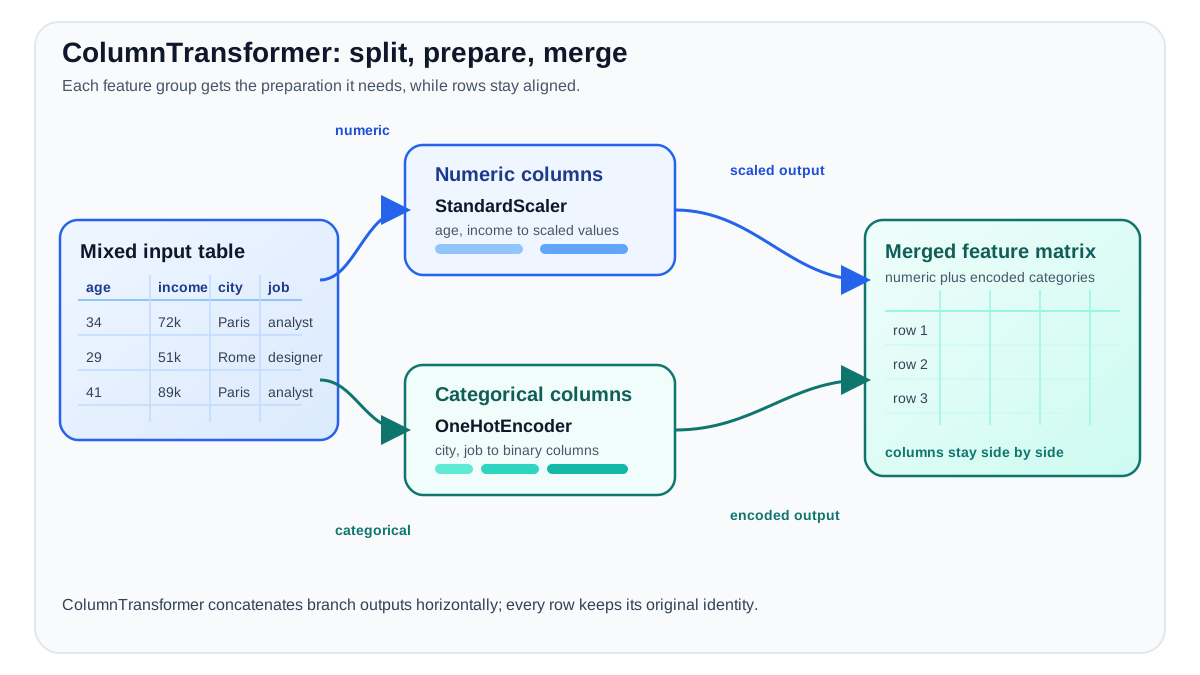
Before the API, let's name the stages clearly. The input table is your original DataFrame with mixed column types. A transformer is a rule that learns something from data (like a scaler learning means, or an encoder learning categories) and then applies a conversion. The feature matrix is the numeric, model-ready output that comes out the other side.
ColumnTransformer gives you a single place to declare how each column group should be transformed. You provide a list of tuples, each containing three things:
- A name for the transformation step.
- The transformer to apply.
- The columns it should apply to.
Here is the shape of it:
from sklearn.compose import ColumnTransformer
from sklearn.preprocessing import StandardScaler, OneHotEncoder

preprocessor = ColumnTransformer(
    transformers=[
        ("num", StandardScaler(), ["age", "income"]),
        ("cat", OneHotEncoder(), ["city", "job"]),
    ]
)
When you fit this object, each transformer learns from its own columns only. The scaler computes its mean and standard deviation from age and income alone. The encoder learns its categories from city and job alone. No column sees a transformer that was not meant for it.
When you transform data, each group is processed independently and the outputs are concatenated side by side into one matrix. The numeric columns come out scaled. The categorical columns come out one-hot encoded.
This is the core mental model: column groups enter, transformers process them independently, and one feature matrix comes out the other side.
Knowledge check
Check your understanding
Answer this question before you continue.
What "Aligned" Actually Means
The promise that the output is "one aligned matrix" sounds automatic. It is not magic—it is a contract with three parts you can observe.
Row alignment. Every branch receives the same rows, in the same order. The first row of your input table produces the first row of every branch's output. When the results are concatenated, row 5 of the transformed matrix still corresponds to row 5 of your original table. The model never mixes one person's age with another person's city.
Feature alignment. Branch outputs are concatenated in the order you listed your transformers. If "num" comes first and "cat" comes second, the scaled numeric columns occupy the left side of the output matrix and the encoded categorical columns occupy the right side. The transformer-list order is the output-column order.
Source mapping. Every output column can be traced back to the branch that produced it. Scaled numeric columns keep their original names. Encoded categorical columns expand into names like city_London and city_Paris. The feature names are your map back to the source columns.
You can verify all three with two quick calls after fitting:
preprocessor.fit(X_train)

print(preprocessor.get_feature_names_out())
print(preprocessor.transform(X_train).shape)
The names tell you what each branch produced. The shape tells you whether columns were dropped, kept, or expanded. If your original table had 10 columns and the transformed output has 14, the encoder probably expanded a categorical column into several indicator columns. Confirm it rather than assuming.
Knowledge check
Check your understanding
Answer this question before you continue.
The Three Decisions You Make When Building One
Building a ColumnTransformer means making three design choices.
Decision 1: Group columns by what they need, not by what they are called.
Column names can mislead you. A column called "code" might contain numeric-looking strings that are really categories. A column called "year" might be better treated as a number or as a category depending on your problem. Group by the transformation the feature actually requires.
Decision 2: Choose the right transformer for each group.
This is where your earlier knowledge of scaling and encoding pays off. Numeric columns might get a StandardScaler, a MinMaxScaler, or an imputer followed by a scaler. Categorical columns might get a OneHotEncoder or an OrdinalEncoder. The ColumnTransformer does not make these choices for you—it gives you a clean place to express them.
Decision 3: Decide what happens to columns you did not list.
The remainder parameter controls the fate of unlisted columns. The default is "drop", which silently discards them. Set it to "passthrough" to keep them unchanged, appended to the end of the transformed output. You can even pass a transformer to process all remaining columns uniformly.
One rule matters here: a column can appear in only one group. Overlapping groups would double-transform a column, and scikit-learn will raise an error to stop you.
Tip: Name your groups so the workflow reads like a sentence.
("numeric_scaling", StandardScaler(), num_cols)is easier to debug than("t1", StandardScaler(), num_cols).
Knowledge check
Check your understanding
Answer this question before you continue.
Why This Belongs Inside a Pipeline
A ColumnTransformer alone is just preprocessing. It becomes powerful when you wrap it with a model in a Pipeline:
from sklearn.pipeline import Pipeline
from sklearn.linear_model import LogisticRegression

model_pipeline = Pipeline(
    steps=[
        ("preprocessor", preprocessor),
        ("classifier", LogisticRegression()),
    ]
)
Now the whole workflow—preprocessing and prediction—is one object that fits and predicts together. When you call fit on the pipeline, the ColumnTransformer learns its statistics and categories from the training data only. The test set never influences what the scaler learns or which categories the encoder knows about.
The same fitted workflow can transform new data at prediction time without re-learning anything. The scaler uses the means and standard deviations it already computed. The encoder uses the categories it already saw. New data flows through the same preparation steps, producing output the model knows how to read.
This is also what makes cross-validation trustworthy. Every fold re-fits the entire pipeline on that fold's training portion only. Preprocessing never sees validation data before the model does. If you had prepared your data once, before splitting, every fold would be cheating—the scaler would already know the validation set's distribution.
Common Beginner Mistakes and How to Recover
Several failure modes appear again and again. Knowing them in advance saves you the debugging session.
Fitting before splitting. If you fit the ColumnTransformer on the whole dataset before creating your train-test split, the scaler's statistics and the encoder's categories have already seen the test data. Your evaluation scores will look better than they should. The fix is structural: put the ColumnTransformer inside a Pipeline and fit the pipeline on training data only.
Common mistake: Fitting the
ColumnTransformeron the whole dataset before splitting is the most expensive error in this workflow. It does not crash—it silently corrupts your evaluation.
Forgetting the remainder setting. The default remainder="drop" silently removes any column you did not list. If you forgot to include a column in any group, it vanishes without an error. Check the output shape and feature names to catch this.
Assuming the output column count matches the input. Encoding expands categorical columns. If you expect 10 columns and see 14, that is probably correct behavior—but verify it rather than assuming.
Putting the same column in two groups. Overlapping groups double-transform a column. Scikit-learn will raise an error, which is a gift: it forces you to decide which transformation the column actually needs.
The recovery pattern is always the same: inspect the fitted transformer, check the output shape, and read the feature names. The error message and the output usually reveal what went wrong.
When ColumnTransformer Is the Right Tool (and When It Is Not)
Use ColumnTransformer when your table mixes feature types that need different preprocessing. That is the normal case for real tabular data. If different columns need different treatment, this is the clean way to say so in one place.
You can skip it for a small, all-numeric table where one scaler handles every column. If every feature needs the same transformation, a plain Pipeline with a single preprocessing step is simpler and perfectly adequate. The same goes for quick prototyping on a single-type dataset—do not add structure you do not need.
The rule of thumb: different columns, different treatment, one workflow. That is when ColumnTransformer earns its place.
Your Next Step
Build a small mixed table with a few numeric and categorical columns. Group the columns by what they need. Wrap the ColumnTransformer in a Pipeline with a simple model. Fit it on training data, then inspect the transformed output's shape and feature names.
The payoff is not cleaner code alone, though cleaner code is a genuine benefit. The payoff is an evaluation you can trust, because every fold re-fits preprocessing on training data only. When your cross-validation scores are honest, your model decisions are honest too.
From here, the natural next direction is tuning the whole workflow with grid search—letting the search explore not just model parameters but preprocessing choices as well, all inside the same leakage-safe pipeline.
Knowledge check
Final check
Finish the article by checking the ideas you just learned.
References
Build stronger machine learning foundations
Use structured resources to connect theory, scikit-learn workflows, and evaluation practice.


