
Run a Bounded Hyperparameter Search With Scikit-Learn
A search is not a machine that finds the best number. It is a bounded experiment whose output is a comparison.

Key topics
A search is not a machine that finds the best number. It is a bounded experiment whose output is a comparison.
You write a search space with twelve values per parameter, hit run, and twenty minutes later you still cannot say whether the winning setting is real or lucky. The problem is rarely the code. It is the mental model. By the end of this tutorial you will have a runnable search, a results table you can actually read, and a test set that has not been touched.
What a Search Object Actually Does
Before you configure anything, hold the right picture in your head. A scikit-learn hyperparameter search bundles five decisions into one object:
- an estimator (the model being tuned)
- a parameter space (the candidate values)
- a sampling method (grid or random)
- a cross-validation scheme (how folds are built)
- a score function (what "better" means)
For every candidate setting, the search fits the estimator on each training fold, scores it on the held-out fold, and averages the scores. The winner is the setting with the best average, not the best single fold. That distinction is the whole point of cross-validation hyperparameter tuning: one lucky fold should not crown a model.
After fitting, the search object behaves like the estimator it wraps. It exposes predict and score, and by default it refits the winning setting on the full development set, so best_estimator_ is ready to use.
One boundary worth naming: only hyperparameters belong in the search space. These are values you set before training, like C or max_depth. Parameters learned during training, such as coefficients or split thresholds, are not yours to search.
If you have already read about train/validation/test boundaries, you know why the test set must stay out of this loop. Here we only need the operational consequence: the search sees the development set and nothing else.
Knowledge check
Check your understanding
Answer this question before you continue.
Set Up the Development and Test Boundary First
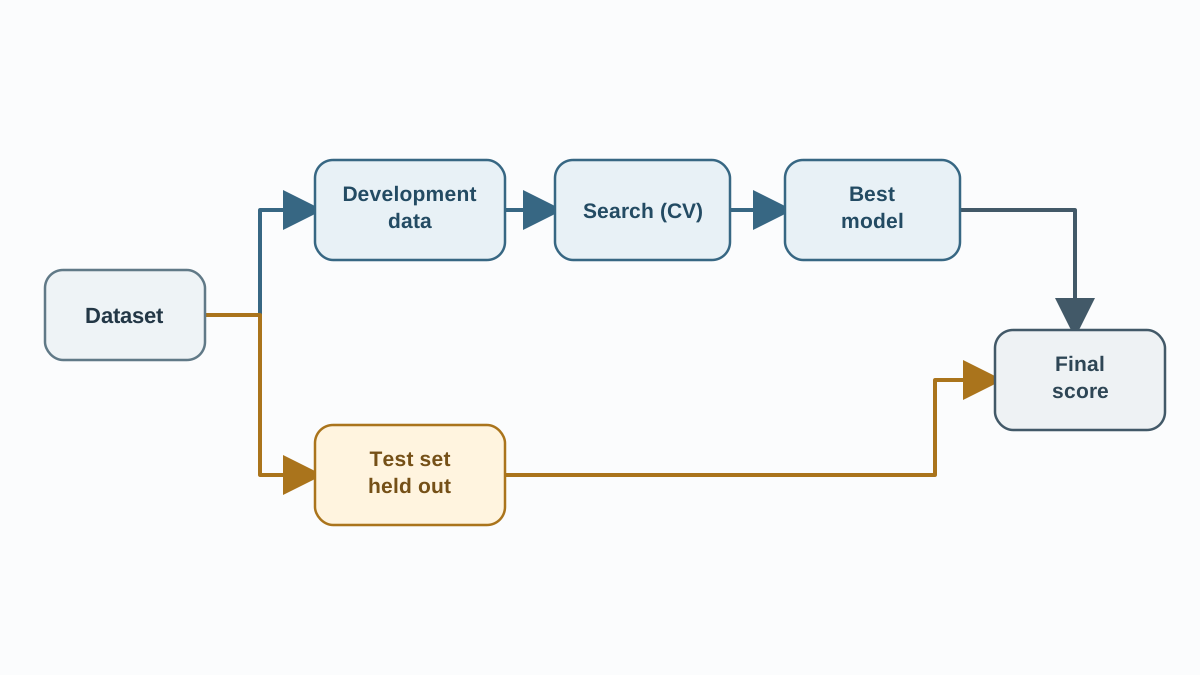
Make the split the first line of code, before you write a single parameter value. Once you have seen a test score, you cannot unsee it, and every later decision is quietly informed by it.
import numpy as np
from sklearn.datasets import load_breast_cancer
from sklearn.model_selection import train_test_split

X, y = load_breast_cancer(return_X_y=True)

X_dev, X_test, y_dev, y_test = train_test_split(
    X, y, test_size=0.2, random_state=42, stratify=y
)
The environment assumption is plain: scikit-learn, NumPy, pandas, and SciPy, with a small built-in dataset so the example runs anywhere. SciPy matters because the search space below samples from scipy.stats. The stratify=y argument keeps the class balance similar in both parts, which matters on small datasets.
From here on, the search code references X_dev and y_dev. It never mentions X_test. That is not a stylistic choice; it is the boundary that keeps your final estimate honest.
Note: A single split is a coarse boundary. If your dataset is small, the development set itself will be cross-validated inside the search, which is exactly what the next section does.
Knowledge check
Check your understanding
Answer this question before you continue.
Build a Bounded Search Space
Bounded means you can state, in one sentence, why each value is in the list and what range it covers. If you cannot, you are guessing with extra steps.
I reach for two habits here. First, use logarithmic spacing for scale-sensitive parameters such as C or alpha. Linear spacing wastes candidates in a region that behaves almost identically. Second, keep the space small enough that you can explain it.
Grid search enumerates the full cartesian product, so cost multiplies fast. Random search samples a fixed number of candidates and is the better default when only a few parameters actually matter. For random search, continuous distributions from scipy.stats let a larger n_iter keep refining the same range instead of re-testing the same discrete points.
from scipy.stats import loguniform
from sklearn.linear_model import LogisticRegression
from sklearn.pipeline import Pipeline
from sklearn.preprocessing import StandardScaler

pipe = Pipeline([
    ("scaler", StandardScaler()),
    ("clf", LogisticRegression(max_iter=1000)),
])

param_dist = {
    "clf__C": loguniform(1e-3, 1e2),
    "clf__penalty": ["l2"],
}
A practical starting budget for a beginner: a handful of values per parameter, two or three parameters, and five folds. Do the arithmetic before you run. Two parameters with four values each and five folds is 4 × 4 × 5 = 80 fits. That number is your cost, and it should be visible before you press enter.
Common mistake: Fitting the scaler outside the search leaks validation information into every fold. Wrapping scaling in a
Pipelinemeans it is refit inside each fold, which is what keeps the estimate honest.
Knowledge check
Check your understanding
Answer this question before you continue.
Run the Search and Read the Results
Fit the search on the development data only, with a fixed random_state so the run is repeatable.
from sklearn.model_selection import RandomizedSearchCV

search = RandomizedSearchCV(
    estimator=pipe,
    param_distributions=param_dist,
    n_iter=20,
    cv=5,
    scoring="roc_auc",
    random_state=42,
    n_jobs=-1,
)

search.fit(X_dev, y_dev)

print("Best params:", search.best_params_)
print("Best mean CV score:", round(search.best_score_, 4))
Inspect best_params_ and best_score_ first, then open cv_results_ for the full picture: mean test score, standard deviation across folds, and rank for every candidate.
import pandas as pd

results = pd.DataFrame(search.cv_results_)
cols = ["rank_test_score", "mean_test_score", "std_test_score", "params"]
print(results[cols].sort_values("rank_test_score").head())
You should see a small table sorted by rank, with a mean score and a spread for each candidate. That table is your success criterion. If it looks like a wall of near-identical numbers, the search space was too narrow to matter.
The standard deviation matters as much as the mean. Two settings with nearly identical means but very different spreads are not equally trustworthy. A setting that wins by 0.002 with a spread of 0.05 is noise wearing a crown.
Because refit=True is the default, the winning setting is refit on the whole development set, which is why search.best_estimator_ is ready to predict.
Knowledge check
Check your understanding
Answer this question before you continue.
Finish With One Honest Test-Set Evaluation
The search is done. The development-set comparisons are done. Now you spend the test set, once, and never feed the result back into tuning.
from sklearn.metrics import roc_auc_score

final_model = search.best_estimator_
test_score = roc_auc_score(y_test, final_model.predict_proba(X_test)[:, 1])

print("Final test ROC AUC:", round(test_score, 4))
This is the number you report. It is not a candidate to compare against other settings, and it is not a reason to rerun the search with a different range. The moment you use it to choose anything, it stops being a test set and becomes a validation set you happened to call by another name.
Expect the test score to differ from best_score_. The search's mean CV score is an average over folds on the development data; the test score is a single measurement on data the model has never seen. A small gap is normal. A large gap usually means the search overfit the validation folds, the split was unlucky, or the two sets are not drawn from the same distribution.
Warning: If you find yourself running the test evaluation, changing a parameter, and running it again, stop. That loop is tuning on the test set, and it quietly converts your honest estimate into an optimistic one.
Failure Modes You Will Actually Hit
The winning setting sits at the edge of the grid. That is a signal, not a result. The search is telling you the useful range lies outside what you gave it. Widen the range and rerun.
Preprocessing fitted outside the search. If you scale or encode before the search, every fold sees information from the others. Wrap it in a pipeline.
A typo in a parameter name. Scikit-learn raises an error at fit time and names the offending key. Read the message instead of guessing.
Scores that swing wildly across folds. Usually too few samples, too many folds, or a metric that is unstable on small validation sets.
Tuning against the test set, even once. That converts it into a validation set and destroys your only honest estimate.
One Modification Worth Trying
Change exactly one thing and compare. Swap grid search for random search with the same budget, or widen one parameter's range. Keep the test set untouched through the comparison; the experiment is about the search, not the final number.
If the winner barely moves, the extra search budget bought little. If it moves a lot, your original range was the bottleneck. Record the seed, the search space, and the selected settings so the comparison is reproducible rather than remembered.
Where This Leaves You
Run the search on the development set. Read the mean and the spread together. Touch the test set exactly once, at the end, and report that number without letting it steer anything.
The natural next question is whether the selected score itself is optimistic, since you chose it by looking at validation folds. That is what nested cross-validation exists to answer. For now, take one concrete action: rerun your own search with a narrower range and a fixed seed, then compare the selected settings against your first run. The difference will tell you whether your search space or your budget was the real constraint.
Knowledge check
Final check
Finish the article by checking the ideas you just learned.
References
Build stronger machine learning foundations
Use structured resources to connect theory, scikit-learn workflows, and evaluation practice.


